Tuesday, 16 July 2013

Exchange 2013: 421 4.3.2 Service not available

Today I had an issue with a new Exchange 2013 deployment, which had the CAS and MBX role collocated. After about 8-12 hours my Exchange 2013 server will respond with;

Trying x.x.x.x...
Connected to x.x.x.x.
Escape character is '^]'.
421 4.3.2 Service not available
Connection closed by foreign host.

And in the SMTP protocol logs i would have the following - 421 4.3.2 Service not available all of a sudden;


When i created my Internet Receive connector - I selected the Hub Transport Role which is incorrect:
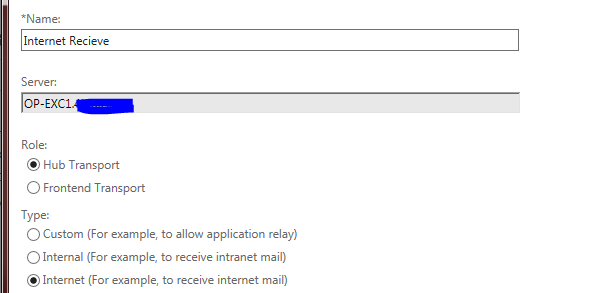


When creating a Internet Receive connector, you should assign the receive connector to the Frontend Transport Role;


When i read the Mail Flow explained article on Exchange 2013 it became apparent i made a mistake (http://technet.microsoft.com/en-us/library/aa996349(v=exchg.150).aspx)
  • Front End Transport service   This service runs on all Client Access servers and acts as a stateless proxy for all inbound and outbound external SMTP traffic for the Exchange 2013 organization. The Front End Transport service doesn't inspect message content, only communicates with the Transport service on a Mailbox server, and doesn't queue any messages locally.

Hopefully this helps people who made the same mistake as me.

Wednesday, 2 May 2012

Installing Lync Database Error

Problem:
When installing the Lync Server Databases the following error was thrown;
Installed SQL Server 2005 Backward Compatibility version is 8.05.2312
Connecting to SQL Server on
SqlMajorVersion : 10
SqlMinorVersion : 50
SqlBuildNo : 2500
SQL version is acceptable: 10.50.2500.0
Default database data file path is D:\Data
Default database log file path is E:\Logs
Database doesn't exist.
(Database rgsconfig doesn't exist.)
Creating database rgsconfig
    DbFile : PhysicalName = d:\data\rgsconfig.mdf
    LogFile: PhysicalName = e:\logs\rgsconfig.ldf
Failed to create database rgsconfig
Error (
  name:        Error
  description:
  number:      -2147221504
  message:    
)
---------------
Exit code: ERROR_CREATE_DB (-4)
---------------


Resolution:

Friday, 27 April 2012

Mailbox Permissions - Exchange 2007 / 2010

Today a client requested a method to find out who had access to users mailboxes. I came up with a quick script to resolve this:

get-mailbox –resultsize unlimited | Get-MailboxPermission | select identity, user, @{name="Access Rights";expression={$_.get_accessrights()}},isinherited,deny | ?{@('NT AUTHORITY\SELF','DOMAIN\Domain Admins','DOMAIN\Administrator','DOMAIN\Exchange Servers','DOMAIN\Public Folder Management','NT AUTHORITY\SYSTEM','NT AUTHORITY\NETWORK SERVICE','DOMAIN\Delegated Setup','DOMAIN\Organization Management','DOMAIN\Exchange Trusted Subsystem','DOMAIN\Enterprise Admins'
) -notcontains $_.User}

The main component of the script is which users you wish to exclude from the results, I added all the access entries that were added by default by exchange. For me it was the following Accounts:

NT AUTHORITY\SELF
NT AUTHORITY\SYSTEM
NT AUTHORITY\NETWORK SERVICE
DOMAIN\Public Folder Management
DOMAIN\Organization Management
DOMAIN\Exchange Trusted Subsystem
DOMAIN\Exchange Servers
DOMAIN\Enterprise Admins
DOMAIN\Domain Admins
DOMAIN\Delegated Setup
DOMAIN\Administrator

You could then pipe the results to a CSV file using the Export-Csv Cmdlet

Wednesday, 18 April 2012

Default Profile–Windows Server 2008R2

Today I had an issue at a clients trying to change the default profile on Windows Server 2008 R2.

I had completed all the steps required, but when i tried to copy the profile the option was greyed out
11-04-2012 11-28-24 AM

I found a program called Windows Enabler 1.1 which is available from here: Windows Enabler 1.1

Running this program as an administrator:
18-04-2012 12-16-55 PM

And clicking on the tray icon to enable it
18-04-2012 12-17-45 PM

I was then able to click the Copy To button (you may need to click a greyed out button twice)
11-04-2012 11-29-22 AM

Tuesday, 6 March 2012

MSP to MSI - Office Communicator

Today I needed to help a client update Office Communicator 2007 R2 in preparation for their Lync migration. They had deployed Office Communicator via Group Policy using an MSI, I wanted to create an MSI that encompassed the latest Office Communicator MSP. These are the steps I performed:

I firstly Downloaded the latest communicator client update from: http://technet.microsoft.com/en-us/office/ocs/ee695846 At the time of writing this, the latest update was January 2012: http://www.microsoft.com/download/en/details.aspx?displaylang=en&id=21547

I created a working directory with both the MSI and MSP.

I then performed an admin install of my MSI using the command:


msiexec /a "PATH TO COMMUNICATOR.MSI" TARGETDIR="create a new folder called Admin within your working directory"

For me the command was:

msiexec /a "C:\Documents and Settings\username\Desktop\OCS2007r2\communicator.msi" TARGETDIR="C:\Documents and Settings\username\Desktop\OCS2007r2\admin"


This creates an admin install of communicator to my working directory, you can see the files it created.

Tuesday, 24 January 2012

What are Lync Response Groups

A customer asked me a question today, in simple terms what is a response group? It’s a queue of agents which you can connect to either by calling a DID, or selecting the response group in your contacts list.

It’s essentially skills based routing.

I’ve configured one a response group for (4Logic Support Desk). This is configured as a hunt group, which means I can present the it with a DID and people will be able to contact a support agent. I have also added myself as an agent in the 4Logic Support Desk.


When I sign into Lync, it informs me that I have been added to the Line Hunt. There are two modes of participation in a Response Group, formal or informal. Formal is where I can choose to be signed into the Response Group and informal is where I have no choice. I have configured 4Logic Support Desk as formal participation.


To sign into this group I click settings > tools > response group settings:


This opens a website which allows me to sign into the response group:


I can now receive calls for the 4Logic Support Desk and call out as the 4Logic Support Desk.


Friday, 13 January 2012

Microsoft Lync and Exchange 2010 OWA integration.


I had to setup OWA integration for Microsoft Lync and came into a few errors. I used this post by Microsoft as a base: http://blogs.technet.com/b/ilvancri/archive/2010/09/22/configuring-exchange-2010-sp1-and-lync-rc-to-enable-owa-as-lync-endpoint.aspx

But here is a step by step guide of how I set it up in my enviroment.

Step 1: Deploy Lync components to the exchange CAS server.

OCS Web services


When running Exchange2010 Sp1 on a Windows 2008 R2, include the following UCMAREDIST Update, available here
http://www.microsoft.com/download/en/details.aspx?id=19178

Step 2: Configure Exchange 2010 Client Access Servers


From exchange management shell run and take note of the Thumbprint: 
Get-ExchangeCertificate | where {$_.Services -ilike "*IIS*"} | fl